MA
Michael Ayala
UX + Product Design
AboutContact Me
UI Design
← All Case Studies

SecureHome Security App
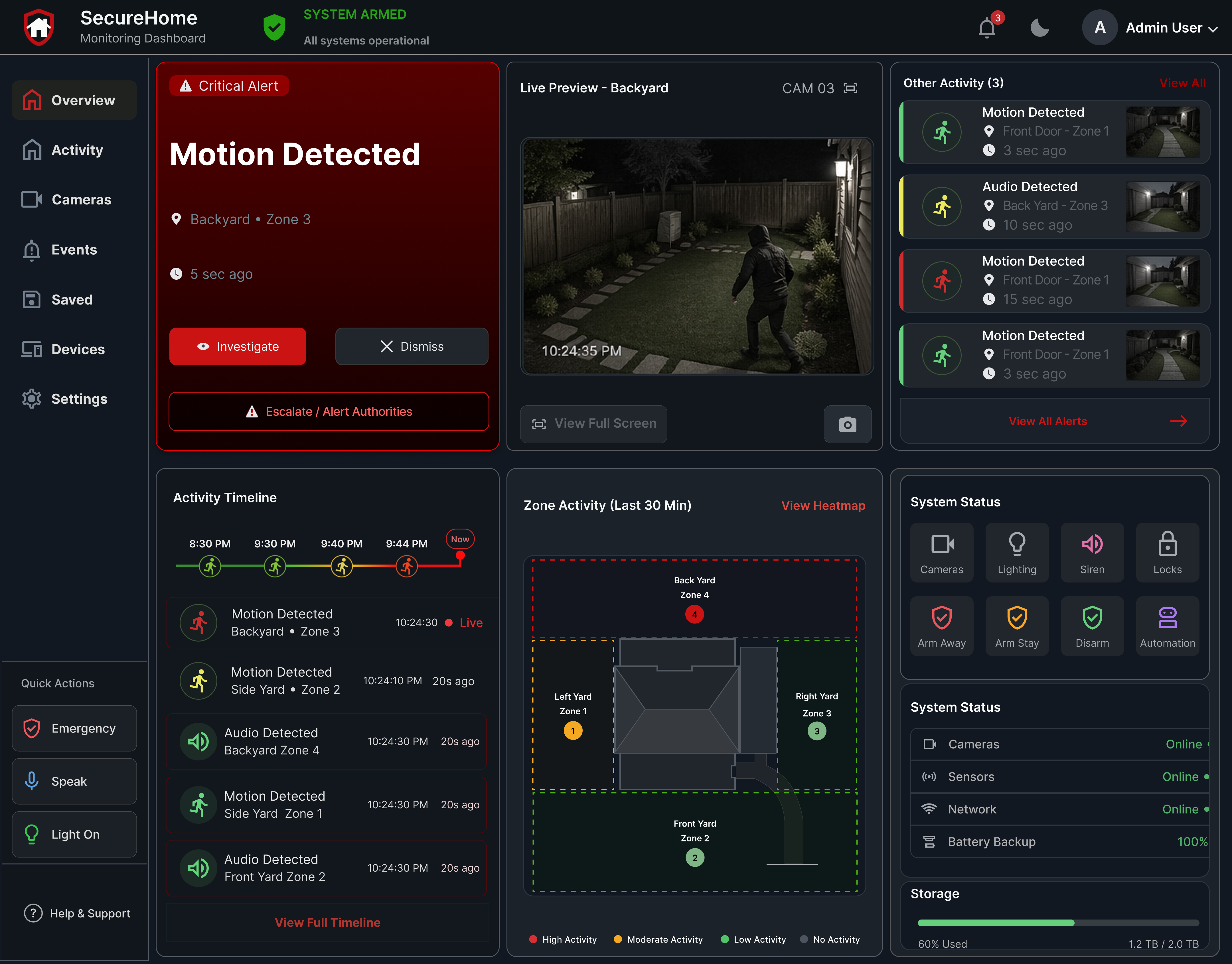
SecureHome is a smart home security dashboard designed to help users quickly understand alerts, monitor activity, and respond with confidence through a clear, centralized interface.
Dashboard concept
Real-time alerts • camera preview • system status
SecureHome security dashboard showing a motion alert, live camera feed, recent activity, zone monitoring, and system status.
Role:
UX/UI Designer · Product Designer · Visual Designer
Timeline:
3 Weeks
Tools:
Overview

A centralized dashboard for smart home security monitoring

SecureHome is a smart home security dashboard concept designed to help users monitor their home, understand alerts, and take action quickly.

The project focused on simplifying a complex security system into a clear dashboard experience. Instead of forcing users to search through multiple screens, the interface brings together camera feeds, alert activity, device status, quick actions, and system health in one centralized view.

The goal was to create an interface that supports fast decision-making during moments of uncertainty, while still feeling calm, organized, and easy to scan.
Real-time Awareness

Live updates and alerts keep users informed instantly.

Clarity at a Glance

Prioritized information reduces noise and confusion.
Action with Confidence

Clear next steps and controls empowers users to respond.

The Problem
Home security information is often scattered, delayed, and hard to interpret when it matters most.
What happened?
Users struggle to quickly understand the nature of an alert.
Where did it happen?
Locating the event source across cameras, sensors, or devices can take too long.
How serious is it?
Limited context makes it difficult to prioritize which alerts need immediate attention.
What should I do next?
Next steps and controls are not always clear or easy to access in the moment.

The Solution

A centralized dashboard that organizes security information by priority, provides real-time context, and enables fast, confident action.
Unified dashboard view
System status, alerts, cameras, and smart devices are brought together in one place.
Context-rich alerts
Severity, location, live previews, and timelines help users interpret events quickly.
Clear action paths
Primary controls and next steps are available directly from the dashboard.
Faster decision-making
The interface reduces searching, switching screens, and second-guessing during uncertain moments.

Approach

I approached SecureHome as a product design and dashboard UX project focused on helping users quickly interpret system activity and respond to potential security events. The interface was organized around clarity, reusable components, and fast decision-making during moments of uncertainty.

Prioritized urgent information

I structured the dashboard around alert severity, location, time, and recommended action so users could understand what needed attention first.

Reusable dashboard components

I designed repeatable cards, icon states, image states, and content patterns to keep the interface consistent across alerts, cameras, devices, and system status.

Fast, responsive design

I reduced unnecessary screen switching by surfacing live previews, quick controls, and contextual next steps directly inside the main dashboard.
Alert cards
Live camera preview
Event timeline
Zone activity
Device status
Quick controls
Severity states
Responsive card logic

Key Features

Activity Timeline

Recent activity is organized into a timeline so users can review security events in chronological order and understand what changed over time.

Security activity timeline showing recent motion and audio events in chronological order.

Live Camera Preview

The dashboard includes a live camera preview area so users can immediately verify activity without leaving the main screen.
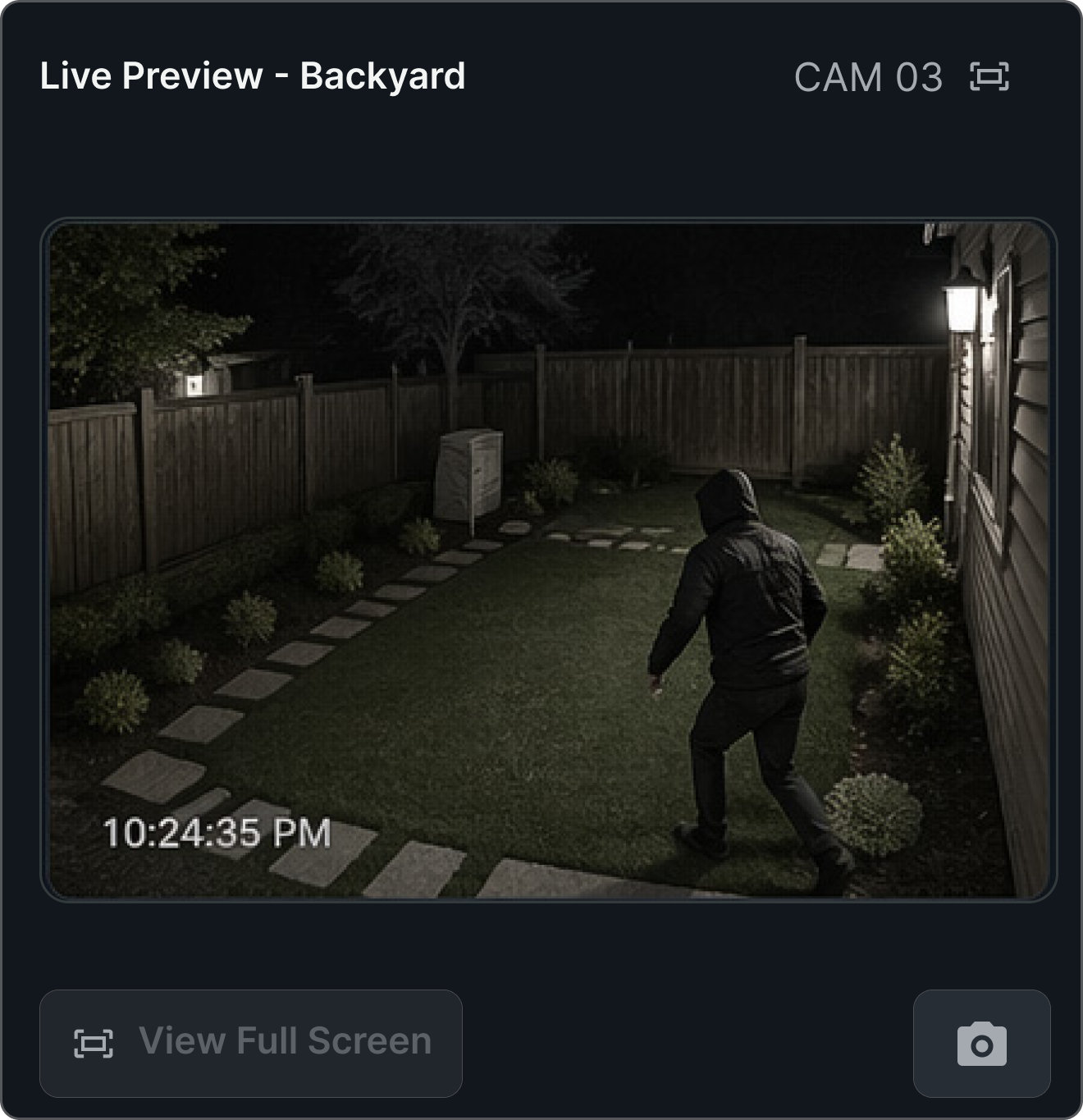
Live backyard security camera preview displayed within the SecureHome dashboard.

Prioritized Alert Cards

Reusable alert cards communicate the event type, severity level, location, time, and recommended action. This helps users quickly understand what happened and whether immediate attention is needed.
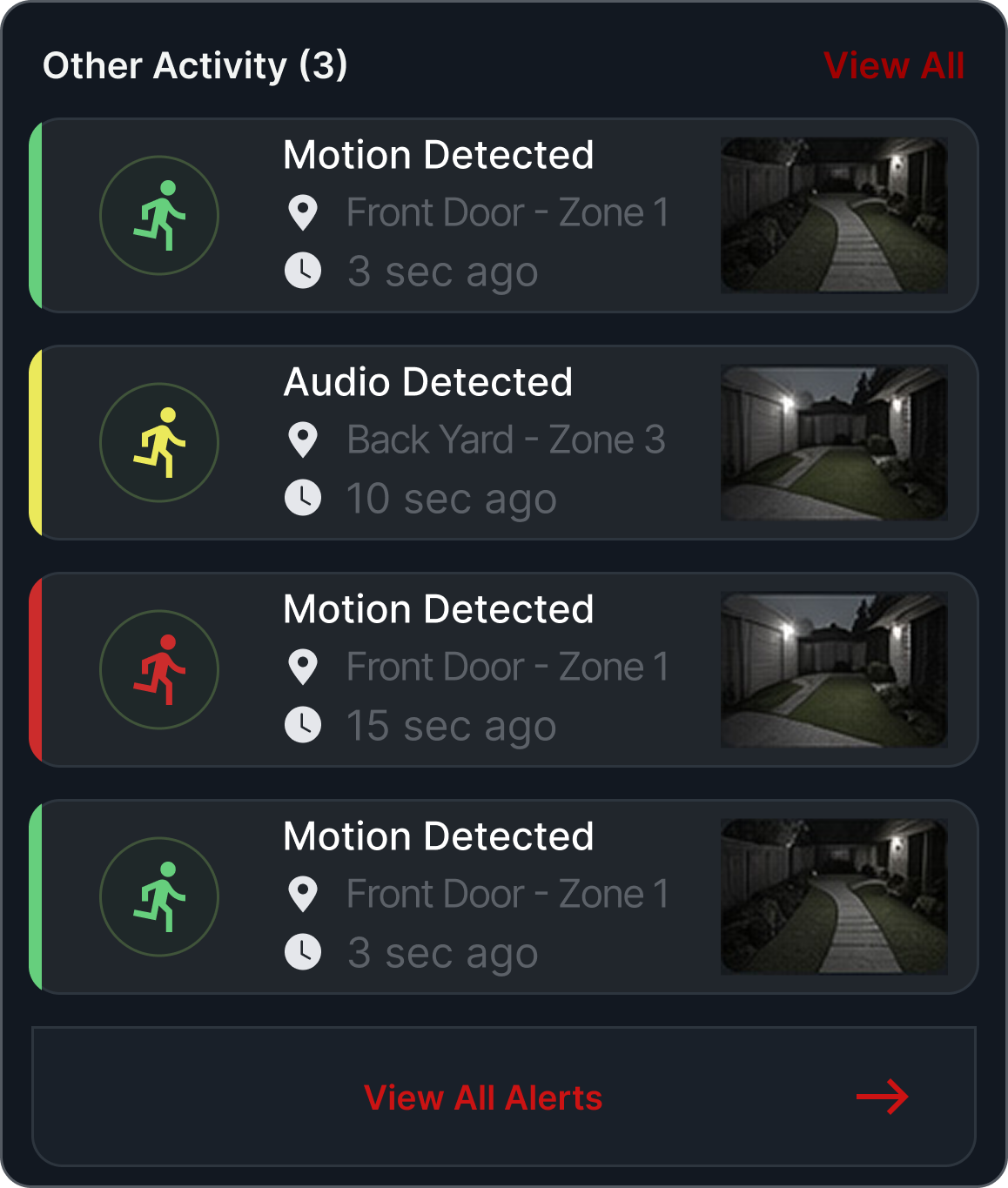
Color-coded security alert cards showing event type, location, time, and priority.

Impact

The SecureHome dashboard improves the user experience by making security information easier to scan, prioritize, and act on.

Faster understanding

Clearer information hierarchy helps users grasp home security status quickly.

Reduced cognitive load

Prioritized alerts and concise summaries lower mental effort during critical moments.

Better visibility

Real-time status and live visuals increase awareness across devices and events.

Stronger confidence

Consistent patterns and actionable insights empower users to act with certainty.

Outcome

The final SecureHome concept is a centralized smart home security dashboard that simplifies complex activity and supports confident decision-making.
Final concept

A centralized dashboard that organizes alerts, devices, and insights for faster action.

Demonstrates

Data-rich interface design, reusable components, visual hierarchy, and systems thinking.

Portfolio value

A product case study showing UX strategy, dashboard logic, and visual execution.
MA
© 2026 Michael Ayala
UX Designer & Product Design
LinkedIn  Resume  Email